Customer support is one of the easiest places to measure what an AI agent does. It is also where a badly built agent does the most damage to customer relationships.
Vendors often quote resolution rates of 70% or more. Not every business gets there. Across the ecommerce brands on the Gorgias helpdesk from October 2025 to April 2026, the median brand's AI agent closed 45% of the tickets it touched without a human message. The top quarter passed 65%.
This guide covers what a support agent can realistically resolve, how to build one customers trust, what it costs and how to work out whether it pays back.
What AI Support Agents Resolve Today
- Gorgias (April 2026, platform data from ecommerce brands): the median brand resolves 45% of AI-touched tickets end to end and the top quarter passes 65%. A resolution here means a ticket closed without a human agent message. The data covers Gorgias merchants with at least 200 AI-touched tickets.
- Intercom (vendor figure): says its Fin agent averages a 76% resolution rate across more than 12,000 customers.
- Salesforce (vendor figure for its own help site, April 2025): said its Agentforce agent was resolving more than 84% of customer questions and handing 4% of conversations to a human.
- Klarna (company figure, February 2024): its AI assistant handled two-thirds of customer service chats in its first month, which Klarna said equals the work of 700 full-time agents. Handled is not the same as resolved.
- Customers see it differently: in a Gartner survey of 5,728 customers carried out in December 2023, only 14% of service issues were fully resolved in self-service of any kind, not only AI.
Plan on 40% to 50%. Base your business case on 40% to 50% resolution in the first year and treat anything higher as a bonus. Each vendor defines a resolution in its own way, so compare like with like before you trust a headline number.
Why Support Is a Common First AI Agent
The data is already there. Every helpdesk holds thousands of solved tickets: real customer problems with correct answers. This is the testing data your agent needs, already organized and searchable.
The results are easy to measure. Resolution time, escalation rate and customer satisfaction (CSAT) scores give you clear before and after numbers within weeks of launch.
The scope is narrow enough to be reliable. A support agent has a defined domain (your product), defined tools (your helpdesk, CRM and knowledge base) and a defined goal (the issue is resolved without escalation).
What Customers Think About AI Support
Customers are wary. In Gartner's survey of 5,728 customers carried out in December 2023, 64% said they would prefer companies did not use AI for customer service. 53% said they would consider switching to a competitor if they found out a company was going to use it. Their top concern was that it would get harder to reach a person.
Attitudes are shifting but the condition is the same. In a Gartner survey of 3,566 customers in February and March 2026, 50% said their interactions are easier when companies use generative AI. 87% said it is essential to offer an option to reach a human agent.
The lesson: customers accept an AI agent that is fast, honest about being an AI and quick to hand over to a person. Most of this guide is about that last part.
The Architecture: What a Real Support Agent Looks Like
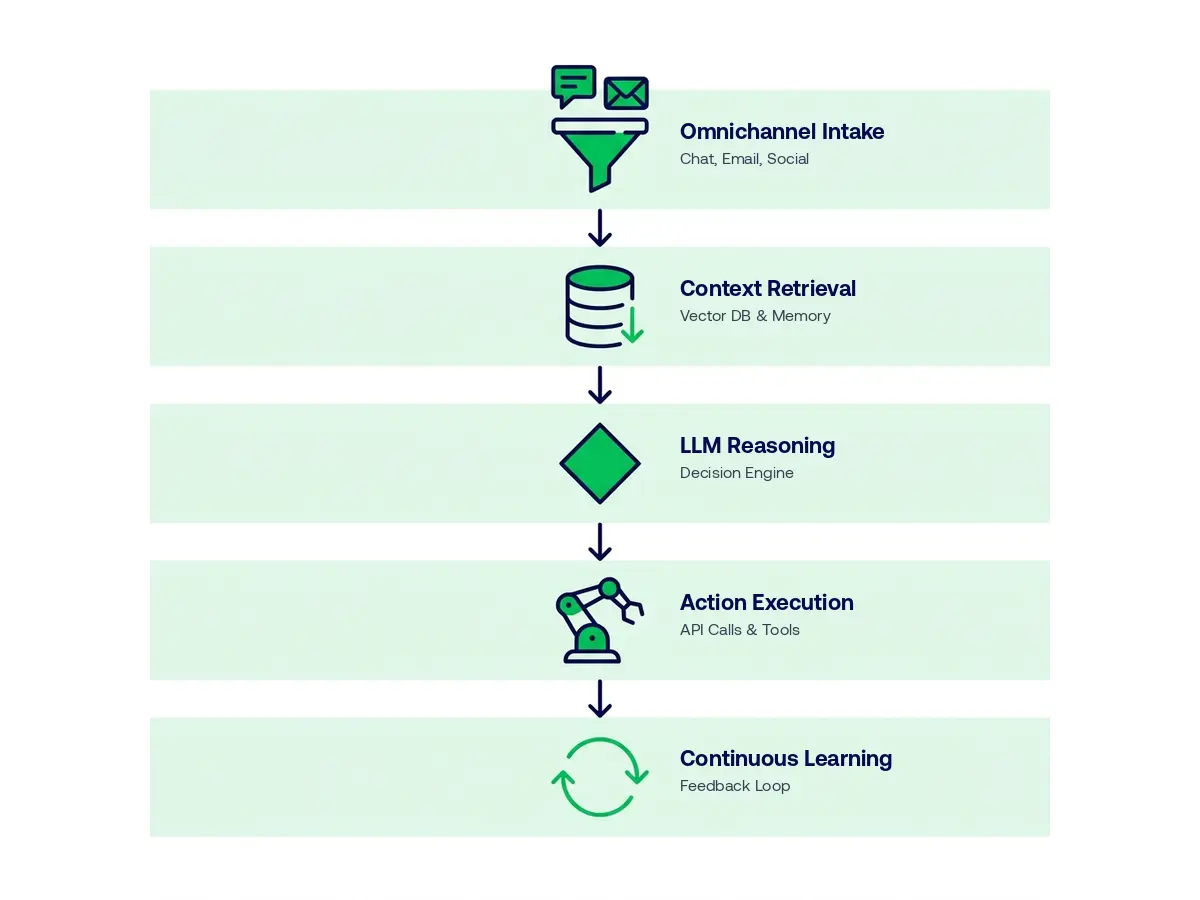
A production AI support agent has five layers.
Layer 1: Intake and classification. The agent receives a ticket by email, chat or API from your helpdesk. It classifies the intent (billing question, bug report, feature request, account issue or shipping question), pulls out key details (order number, product name, account ID) and picks the tools it needs.
Layer 2: Context retrieval. Before replying, the agent gathers context: the customer's account data (tenure, plan, recent orders and past tickets), the knowledge base articles for that intent and internal notes from earlier contacts.
Layer 3: Resolution logic. The agent reasons over the context and intent to choose a path:
- If information solves it: draft a reply from knowledge base content
- If an action solves it: take the action (process a refund, update the account or start a workflow) and confirm to the customer
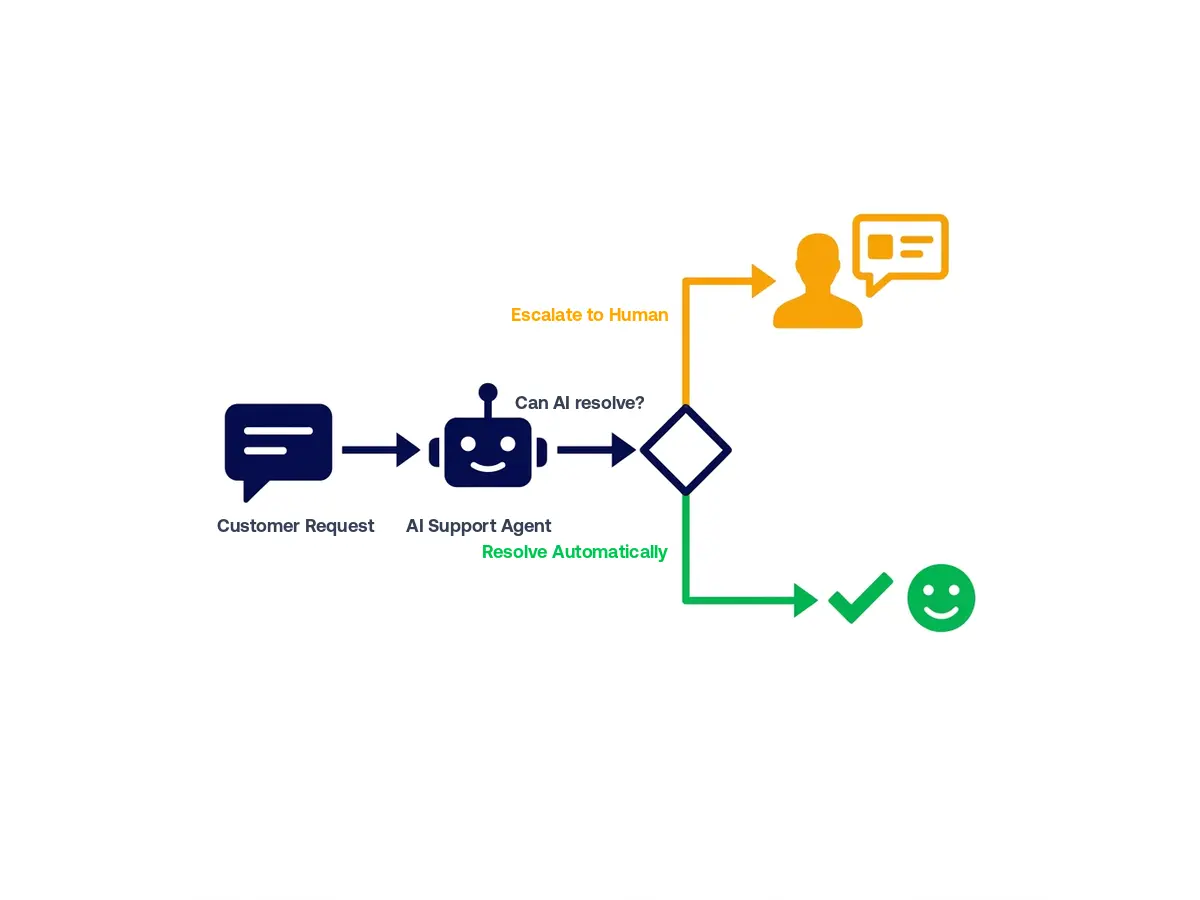
- If escalation rules are met: route the ticket to a human with full context
Layer 4: Response and action. The agent sends the reply or takes the action. For actions such as refunds, account changes and ticket updates, it calls the right API with proper authentication and error handling.
Layer 5: Learning loop. Customer and agent feedback (thumbs up or down, CSAT scores and escalation flags) feeds into prompt changes and knowledge base updates. This is how the resolution rate rises over time.
The Knowledge Base: Your Agent Is Only as Good as This
This is what most teams get wrong. They connect an agent to a thin, outdated or badly organized knowledge base and then wonder why the answers are poor.
Your knowledge base needs to answer three types of questions well:
Policy questions ("What's your return policy?", "Do you offer refunds?", "How long does shipping take?"): these need clear, authoritative answers. Use one document per policy, clearly named and regularly updated.
How-to questions ("How do I reset my password?", "How do I cancel my subscription?"): give step-by-step instructions with screenshots where they help. Have someone who has never done the task test them.
Troubleshooting questions ("My payment isn't going through", "I can't log in", "My order shows delivered but I haven't received it"): write decision-tree content that covers the 5 to 10 most common causes and their fixes.
Audit your knowledge base before you build. Give a new team member 20 real past tickets and your knowledge base. Ask them to resolve each ticket using only those resources. The tickets they can't resolve show you exactly what content to write first.
Escalation Design: Where Most Agents Fail
Customers' biggest worry about AI support is that it will get harder to reach a person. That was their top concern in the Gartner survey published in 2024. Escalation design decides whether customers trust your agent or avoid it.
Escalate immediately on these signals:
- A request to speak to a human ("I want to talk to a person")
- Signs of strong frustration or distress
- Billing disputes above a set amount
- Legal or compliance language ("I'm going to take legal action")
- Safety-related situations, for example in healthcare or financial services
- Repeated contacts about the same issue (two or more without a fix)
How the handover works matters as much as when it happens. The human who takes over should receive a short summary of the issue, everything already gathered, actions already taken, why the agent escalated and the customer's mood. With that summary a person can often resolve the issue quickly. A person who has to repeat every question the bot already asked frustrates the customer.
Never let a ticket disappear. If no human picks up an escalated ticket within your service level, the agent should follow up with the customer and say when to expect an answer. Silence after escalation is the worst outcome.
Implementation Roadmap: 14 Weeks to Full Rollout
Phase 1: Data Preparation (Weeks 1 to 3)
Export the last 12 months of resolved tickets. Group them by intent. Find your 20 most frequent intents: these are your build targets. Update your knowledge base to cover each one. Connect your knowledge base, helpdesk and CRM to the agent.
Phase 2: Build and Internal Testing (Weeks 4 to 8)
Build the agent for your top 10 intents first. Test it internally on real past tickets and measure how often it resolves them correctly before any customer sees it. Our rule of thumb is to reach at least 85% accuracy on the test set before moving on.
Phase 3: Shadow Mode (Weeks 9 to 10)
Run the agent alongside your team on live tickets. The agent drafts replies and people review and send them. You learn where the agent is wrong without exposing customers to its mistakes. Fix the gaps.
Phase 4: Staged Rollout (Weeks 11 to 14)
Turn the agent on for 20% of tickets, starting with the lowest-risk intents. Track live CSAT, escalation rate and resolution accuracy. Expand each week as the numbers hold steady and reach full rollout by week 14.
Phase 5: Continuous Improvement
Review escalated tickets every week. Look for patterns and for issues the agent should handle but doesn't. Update the knowledge base and prompts every month.
Metrics That Matter
Resolution rate: the share of tickets the agent handles that close without a human. Gorgias puts the median at 45% of AI-touched tickets and the top quarter above 65%.
CSAT change: your customer satisfaction score should not drop after launch. If it does, look at escalation design and knowledge base quality first. We aim for CSAT that is flat or better within 60 days.
Response and resolution time: an AI agent replies in seconds instead of minutes or hours. Klarna reported that customers resolved their errands in under 2 minutes, down from 11 minutes before its assistant.
Escalation quality: of the tickets the agent escalates, how many truly needed a human? Our rule of thumb: below 70% means the agent escalates too readily and above 95% means it may not escalate enough.
Cost per resolved ticket: compare what an AI resolution costs you with what a human one costs. The next section shows how.
What an AI Support Agent Costs
Building a custom agent. Agency pricing guides put a support agent at $20,000 to $70,000 and 4 to 8 weeks to build. Our AI agent development cost guide explains where these ranges come from.
Running it. Agency guides put monthly running costs at $500 to $2,000 for a retrieval-based agent (RiseUp Labs) and $2,500 to $5,000 for a customer support agent (Space-O). Four agency guides put maintenance at 15% to 30% of the build cost a year.
Model fees per ticket. These are small. For a ticket that uses 20,000 input tokens and 1,500 output tokens at October 2026 list prices, Claude Haiku 5.5 costs about $0.003, Claude Sonnet 5.5 about $0.06 and the most expensive models, such as Claude Fable 5.1 and GPT-6 Astra, about $0.28.
Ready-made agents. These charge per resolution on top of their plan fees: $0.50 at HubSpot, $0.99 per outcome at Intercom, $1.50 to $2.00 at Zendesk and $2.00 at Salesforce for its Help Agent.
Human tickets for comparison. Gartner put the average cost of a live phone, chat or email contact at $8.01 in a 2019 poll of service leaders, against about $0.10 for self-service. Deloitte Digital's 2026 contact center survey puts the cost of an assisted contact at $7.80. On US wage data a 12-minute ticket costs about $6.15 in staff time.
A Worked Example
These numbers are an illustration, not a client result.
Assumptions:
- 2,000 tickets a month
- 12 minutes of staff time per ticket
- The agent sees every ticket, so its resolution rate applies to all 2,000
- $30.76 an hour per support rep: the US median wage for customer service representatives was $21.53 an hour in May 2025 and benefits make up 30% of total compensation in private industry
- A custom agent that costs $48,000 to build, $500 a month to run and 15% of the build cost a year to maintain ($7,200)
That puts the first-year cost, including the build, at $61,200. The value depends on the resolution rate:
- 25% resolved (500 tickets a month): 100 staff hours a month, worth $36,912 a year. The first year falls $24,288 short and payback takes about 24 months after launch.
- 45% resolved (900 tickets a month, the Gorgias median): 180 staff hours a month, worth $66,442 a year. The first year returns $5,242 more than it costs and payback takes about 11 months after launch.
- 65% resolved (1,300 tickets a month, the Gorgias top quarter): 260 staff hours a month, worth $95,971 a year. The first year returns $34,771 more than it costs and payback takes about 7 months after launch.
Two cautions. First, this value is staff time freed up. It becomes a cash saving only if you hire less or let headcount fall through attrition. Second, escalated tickets are often the hardest ones, so the time your team spends per ticket may rise.
Compare a ready-made agent. At 900 resolutions a month, per-resolution fees come to $450 at HubSpot, $891 at Intercom, $1,350 to $1,800 at Zendesk and $1,800 at Salesforce, plus plan fees. Intercom would cost about $10,700 a year in resolution fees. At this volume a ready-made agent usually costs less. A custom agent makes more sense at higher volumes, when it must take actions inside your own systems or when you want to own the logic and the data.
Not sure whether to buy or build a support agent?
Send us your ticket volume and the helpdesk you use. Within 48 hours we'll tell you whether a ready-made agent or a custom build makes sense and what each would cost. Free, no commitment.
Key Takeaways
- Gorgias data from ecommerce brands puts the median AI resolution rate at about 45%, with the best quarter above 65%. Other vendors' figures are higher and use their own definitions.
- Customers accept AI support when it is fast, honest about being an AI and quick to hand over to a person.
- Fix your knowledge base before you build. The agent can only be as good as its content.
- A custom support agent typically costs $20,000 to $70,000 to build. In our worked example ($48,000 to build, $500 a month to run, 2,000 tickets a month) it pays back in about 7 to 11 months after launch if it resolves 45% to 65% of tickets. Higher build or running costs stretch this.
- At around 2,000 tickets a month or fewer, a ready-made agent priced per resolution is usually cheaper.
Sources
- Resolution rates: Gorgias, April 28, 2026; Intercom Fin (vendor figure, October 2026); Salesforce, April 22, 2025 (vendor figure); Klarna, February 27, 2024; Gartner, August 19, 2024
- Customer attitudes and staffing: Gartner, July 9, 2024; Gartner, August 4, 2026; Gartner, April 28, 2026
- Cost per contact: Gartner, September 25, 2019; Deloitte Digital Global Contact Center Survey, June 2026
- Wages: BLS Occupational Employment and Wages, May 2025; BLS Employer Costs for Employee Compensation, June 2026
- Build and running costs, model and agent prices: see the sources in our AI agent development cost guide
- Disclosure rules: EU AI Act, Article 50; California Business and Professions Code section 17941; Cooley on California SB 1001 (operative July 1, 2019)
Irfan Malik is the CEO and Founder of ibute, with 20 years of experience helping businesses leverage custom software and AI solutions to scale efficiently. He specializes in making complex technology accessible and actionable for business leaders.
Frequently Asked Questions
What share of support tickets can an AI agent resolve?
How much does an AI customer support agent cost?
Will customers know they are talking to an AI?
What happens to my support team?
What types of tickets can AI agents not handle?
How long does it take to launch an AI support agent?
Need a clear path forward?
Get a custom AI roadmap, tailored to your stack, timeline and budget.
Talk to an Expert →