Mid-market and enterprise organizations frequently find themselves sitting on a largely untapped operational asset: transactional histories, supply chain logs, customer accounts and vendor communications locked inside their Enterprise Resource Planning (ERP) systems. As generative AI and LLMs transition from chatbots to autonomous business agents, the pressure is on to connect them to these core databases. However, relying on native, out-of-the-box AI options provided by ERP vendors often leads to high licensing costs, rigid workflows and siloed capabilities. To build an AI integration that creates a true competitive advantage, technical leaders must look beyond native add-ons and design a secure, decoupled API middleware architecture.
The ERP Customization Crisis
Many organizations have massive amounts of data locked inside legacy or highly customized ERP setups. Attempting to bring AI to these setups via native vendor solutions frequently hits a wall.
According to research from Gartner, by 2027, over 70% of recently implemented ERP initiatives will fail to fully meet their original business case goals (Gartner, "What IT Leaders Must Do to Avoid Disappointing ERP Initiatives", 2024). A major contributor to this rate of disappointment is the rigidity of core ERP customization.
When organizations try to use native AI add-ons such as SAP Joule or Oracle Fusion's embedded AI, they encounter significant limitations:
- High Per-Seat Licensing: Vendor add-ons are often priced as high per-user monthly upgrades, which makes wide-scale organizational adoption cost-prohibitive.
- Siloed Boundaries: An ERP-native AI agent cannot naturally cross ecosystem lines. If an AI agent needs to read a customer email in Microsoft Outlook, cross-reference inventory levels in SAP, check a credit score in Salesforce and then generate a shipping bill in Odoo, native assistants cannot easily orchestrate the workflow.
- Restricted Adaptability: Proprietary models are locked into generic search or summarization tasks, offering little room to optimize prompts or swap models for specific, low-latency tasks.
The Rise of AI-Enabled ERP Systems
Despite these initial customization challenges, the business case for connecting AI to transactional databases remains compelling.
Gartner forecasts that 62% of cloud ERP spending will be on AI-enabled solutions by 2027, up from just 14% in 2024 (Gartner Press Release, February 24, 2026). Furthermore, a 2025 Gartner forecast predicts that 40% of enterprise applications will be integrated with task-specific AI agents by the end of 2026, compared to less than 5% in 2025.
Early enterprise adopters are already capturing substantial operational efficiency. Gartner predicts that embedded AI in cloud ERP tools will drive a 30% faster financial close by 2028 (Gartner Press Release, February 24, 2026).
On the bottom-line front, McKinsey's research reveals that "AI high performers" (representing the top ~6% of organizations in McKinsey's State of AI 2025 survey) are reporting EBIT improvements of 5% or more directly attributable to their AI integrations (McKinsey & Company, May 2026).
Why Custom AI Middleware Wins Over Native Add-ons
For most organizations, the key to unlocking these performance gains lies in decoupling the AI logic from the core ERP database.
In its January 2026 report, "Bridging the great AI agent and ERP divide to unlock value at scale", McKinsey points out that integration challenges with existing ERP infrastructure account for nearly 60% of failed AI implementations in businesses with established ERP systems.
A custom-built API middleware layer resolves this integration gap by acting as a secure gateway. This approach provides several key advantages:
- Multi-System Coordination: A centralized middleware built in Node.js or Python can authenticate with multiple databases, CRMs and email systems, coordinating tasks across competitor platforms.
- Model Flexibility: Rather than being locked into a vendor's selected LLM, middleware allows you to choose the best model for the job. You can route simple, high-volume tasks (like invoice categorization) to fast, inexpensive models and reserve reasoning-heavy tasks (like vendor contract negotiation) for larger models.
- Cost Efficiency: Instead of paying high monthly seat licenses for every employee, custom middleware allows thousands of users to benefit from AI features while paying only for actual model token usage.
ERP-Specific Integration Blueprints
Depending on the core system your organization uses, the technical approach to building custom AI middleware will vary. Below is a breakdown of the three major players in the mid-market and enterprise spaces.
1. Odoo (High Flexibility)
Odoo is highly aligned with the modern AI ecosystem due to its core language: Python.
- Integration Ease: Since Odoo's backend and custom modules are written in Python, developers can write custom modules that import AI SDKs (like OpenAI or LangChain) directly.
- Licensing & Codebase: Odoo offers a free, open-source Community Edition and a proprietary, licensed Enterprise Edition. For Community Edition users, custom AI scripts can interact directly with Odoo's PostgreSQL database. For Enterprise Edition users, standard RPC routes are preferred.
- APIs: Middleware primarily communicates with Odoo using its built-in XML-RPC or JSON-RPC protocols. For Odoo 15 and earlier, XML-RPC is standard; Odoo 16+ Enterprise users should evaluate the newer REST API endpoints for external integrations.
2. SAP (Enterprise Rigor)
SAP requires a much more structured, enterprise-grade approach.
- Integration Ease: Modifying the SAP core is notoriously difficult and risky. Instead, developers build decoupled middleware that connects through SAP BTP (Business Technology Platform) or an API Gateway.
- Authentication: The standard communication protocol requires secure token-based OAuth2 authentication to access SAP's services.
- APIs: Integrations rely heavily on SAP's OData (Open Data Protocol) REST APIs or legacy Remote Function Calls (RFC).
3. NetSuite (Structured Cloud ERP)
NetSuite occupies the middle ground, requiring formal developer endpoints.
- Integration Ease: Developers utilize SuiteScript (NetSuite's JavaScript-based scripting language) to trigger actions or format payloads before sending them to the AI middleware.
- Authentication: Requires Token-Based Authentication (TBA) or OAuth 2.0.
- APIs: Integrations are handled via NetSuite’s SuiteTalk REST Web Services or SuiteTalk SOAP Web Services.
| ERP System | API Type | AI Difficulty | Licensing Model | Recommended Approach |
|---|---|---|---|---|
| Odoo | XML-RPC / JSON-RPC (Python) | Low | Community (Open Source) / Enterprise (Proprietary) | Direct connection via custom Python modules or lightweight middleware. |
| SAP | OData / REST / RFC (OAuth2) | High | Proprietary (BTP / User Licenses) | Decoupled API middleware via SAP BTP or secure API gateway. |
| NetSuite | SuiteTalk REST / SOAP | Medium | Proprietary (Subscription-based) | Server-to-server REST integrations with token-based authentication (TBA). |
A Custom B2B ERP Integration Use Case
To understand how this looks in practice, let's walk through two high-impact, conceptual use cases where custom AI agents interact with an ERP through secure middleware.
Use Case 1: Automated Accounts Payable Matching
Processing vendor invoices manually is slow and prone to errors. Decoupled AI middleware automates the pipeline through a clean, sequential flow:
- Step 1: Receipt. A vendor invoice document arrives via email attachment or web upload.
- Step 2: Extraction. The middleware routes the document to an AI-enabled OCR pipeline (utilizing specialized vision models) to extract key-value data such as line-item descriptions, quantities, unit prices, tax amounts and totals.
- Step 3: Verification. The middleware authenticates with NetSuite or SAP's OData API, performing search queries to cross-reference the extracted invoice details against existing purchase orders (POs) and goods receipt records.
- Step 4: Draft Creation. If the line items match within acceptable tolerances, the middleware issues a POST request to the ERP, creating a draft journal entry or bill record, and flags a human supervisor to click "approve" for final posting.
Use Case 2: Natural Language Supply Chain Search
Inventory managers in complex global supply chains frequently struggle to run quick queries across multiple warehouses. A Retrieval-Augmented Generation (RAG) assistant simplifies this:
- Step 1: Query. A procurement officer queries the assistant: "Are our current steel inventory levels in Pakistan sufficient to cover the upcoming manufacturing order, or do we need to route supply from our Austin warehouse?"
- Step 2: Intent Matching. The middleware uses a lightweight model to parse the request, identifying the intent as an inventory check and extracting variables like the SKU and warehouse locations.
- Step 3: Real-Time Fetch. The middleware performs concurrent GET requests to the Odoo/SAP stock table endpoints for both Pakistan and Austin locations to retrieve real-time inventory counts.
- Step 4: LLM Synthesis. The middleware combines these raw stock counts with vendor lead-time PDFs stored in a local vector database. The LLM synthesizes this data into a clear natural-language summary (example output, illustrative only): "Yes, Lahore has 45 tons, which covers the order, but lead times for restocking are currently 12 days longer than average; we recommend keeping Austin's safety stock on standby."
The ERP AI Security Checklist: 7 Guardrails Before You Write a Line of Code
Because ERP systems hold the financial and operational lifeblood of an organization, security cannot be an afterthought. Before writing code, technical teams must establish strict security policies:
- Guardrail 1: Human-in-the-Loop for Write Actions. Never allow an AI agent to execute write actions (such as posting financial transactions, ordering inventory or deleting records) autonomously. The AI should only generate draft records that require manual human review and approval before they are committed to the database.
- Guardrail 2: Zero Data Retention (ZDR) API Configuration. When utilizing commercial LLM API providers, enforce ZDR contract agreements. This guarantees that your transactional business data is never cached or used to train public foundation models.
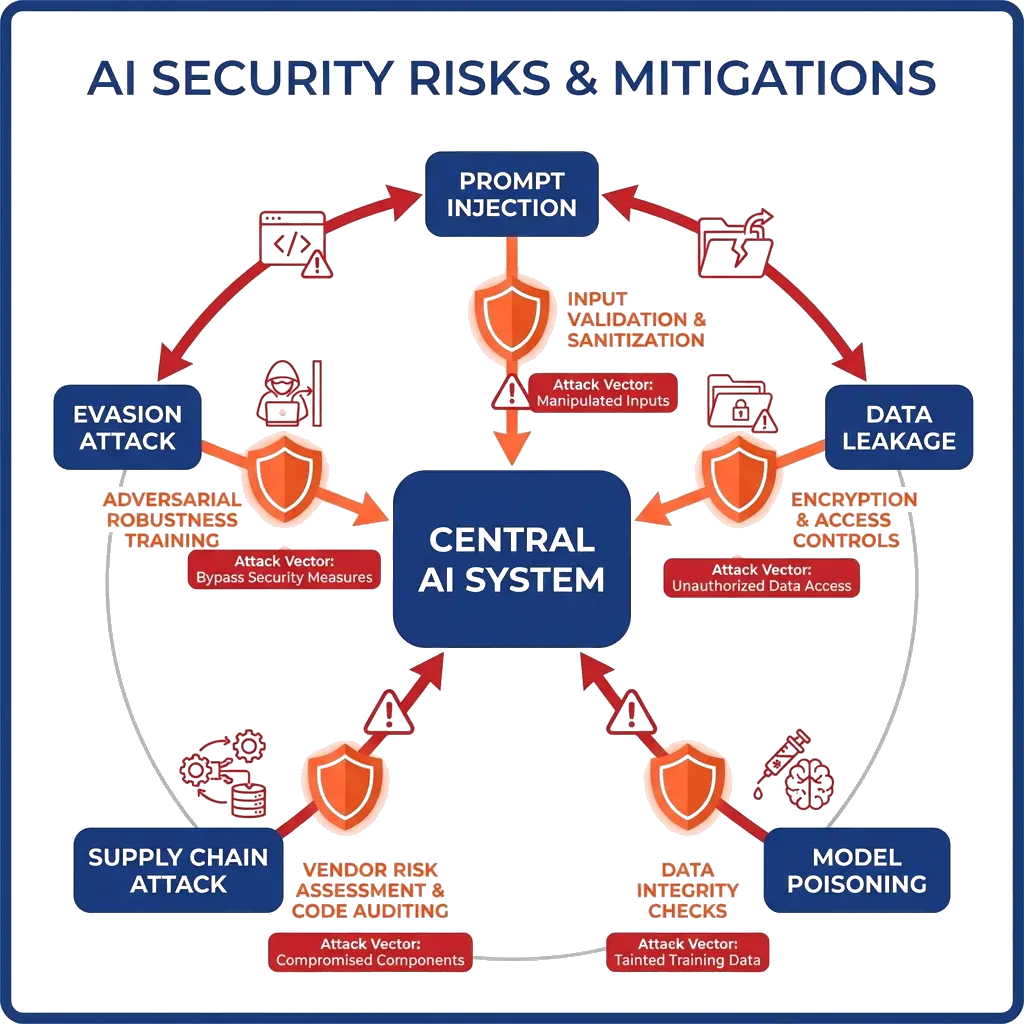
- Guardrail 3: Role-Based API Access Control. Mirror the ERP's role-based access controls (RBAC) in your middleware layer. The credentials used by the AI agent should only allow it to read and write data that the querying employee is personally authorized to access.
- Guardrail 4: Decoupled Middleware Architecture. Never run AI processing logic on the same server hosting your production ERP. Run the middleware in a separate, isolated virtual private cloud (VPC) to ensure that a spike in AI query load never impacts ERP database performance.
- Guardrail 5: Strict Input Sanitization and Parametrization. Protect your database against prompt injection attacks. User queries must be fully sanitized and parameterized in the middleware before they are translated into OData, SQL or RPC requests.
- Guardrail 6: Encrypted Data Transit & Storage. Enforce TLS 1.3 for all API calls between the ERP, the middleware and the LLM. If your middleware caches database schemas or vectorized metadata, encrypt this data at rest using AES-256.
- Guardrail 7: Audit Logging and Monitoring. Maintain comprehensive, tamper-proof logs of every API call made by the middleware. Every prompt, model response, database query and user approval must be logged for compliance audits and troubleshooting.
How to Begin Your ERP AI Integration
The organizations pulling ahead in 2026 are not the ones waiting for SAP or Oracle to ship the right feature. They are the ones building the middleware layer themselves. By establishing clear guardrails and leveraging secure middleware, you can build tools that drive efficiency without sacrificing data integrity.
To ensure your team is aligned on AI safety and best practices before launching an integration, consider establishing corporate AI training across your departments. For complex legacy databases or proprietary ERP architectures, many teams opt for a forward deployed engineering delivery model where engineers embed directly in your repos to wire integrations and build custom eval harnesses. Once your team is trained, the next step is running a secure AI implementation inside a private, sandboxed environment. If you are unsure which backend workflows to target first, you can begin by identifying your highest-impact AI use case using a structured evaluation matrix.
If you are ready to design a custom, secure AI integration roadmap for your SAP, Odoo or NetSuite environment, schedule a 30-minute ERP AI architecture review with the ibute engineering team today.
Irfan Malik is the CEO and Founder of ibute, with 20 years of experience helping businesses leverage custom software and AI solutions to scale efficiently. He specializes in making complex technology accessible and actionable for business leaders.
Frequently Asked Questions
Can we integrate custom AI models directly with SAP or NetSuite?
Is Odoo easier to integrate with AI than SAP?
Will connecting an LLM to our ERP expose sensitive business data?
How much does it cost to build a custom AI integration for an ERP?
Need a clear path forward?
Get a custom AI roadmap, tailored to your stack, timeline and budget.
Talk to an Expert →